 MarineVerse Blog
Try Sailing in Your Browser: Share a Link, Start Sailing
Ahoy!
Ever wanted to show a friend how sailing works, but there was no boat, no wind, or no time?
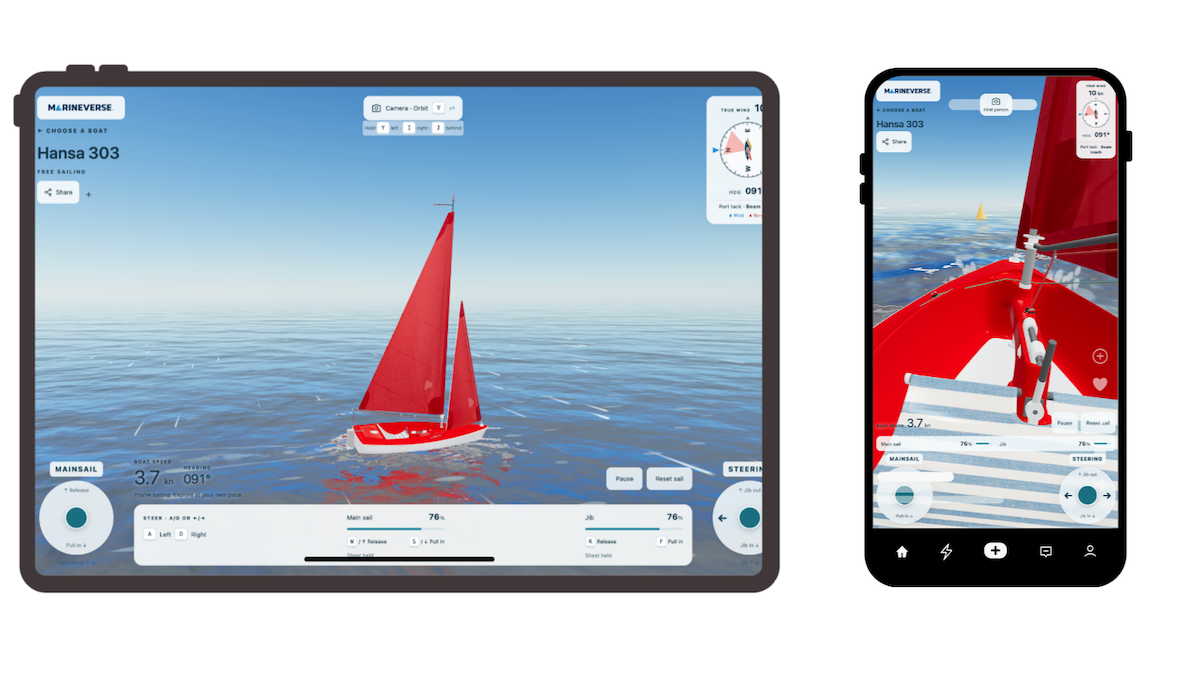
We want to make taking your first steps into sailing as easy as opening a link. With MarineVerse Try Sailing, you can sail a Hansa 303 or an Opti right in your browser. It’s free, with no account, app installation, or VR headset required.
Choose a boat, start sailing, and see what happens when you steer and adjust the sails.
Why We Built It
“Tell me and I forget. Teach me and I remember. Involve me and I learn.”
That’s the idea behind Try Sailing. Getting stuck in the no-go zone can be puzzling when you’re new to sailing. Here, you can turn the boat, adjust the sails, and discover what gets you moving again, all on dry land. It’s a chance to learn by doing before your first day on the water.
If you already sail, share a link with a friend or let someone scan the built-in QR code at your club. Explore the basics together, on a phone, tablet, or computer.
Discover How Sailing Works
Why can’t a boat sail straight into the wind? When should you pull a sail in, and when should you let it out?
This simple simulator gives you a place to experiment with those questions. Turn towards the wind and discover the no-go zone. Bear away, adjust your sail trim, and watch how the boat’s speed changes. Try tacking, turning the bow through the wind, and gybing, turning the stern through the wind.
The instruments show your point of sail and highlight the no-go zone. On-screen guidance helps you recognise when a sail is luffing or pulled in too tightly, and the simulator acknowledges completed tacks and gybes. Simple telltales and wind indicators give you more clues about what the wind and sails are doing.
You can watch from outside the boat or switch to a first-person view to see things from the sailor’s perspective. Take your time, make a change, and watch how the boat responds.
Two Boats, Different Things to Practise
Hansa 303: Main and Jib
We shared the story behind bringing the Hansa 303 to MarineVerse Sailing Club last year. Now you can meet it in your browser, too.
The Hansa 303 has a mainsail and a jib, giving you two sails to manage independently. Experiment with their trim and notice how it affects both speed and steering: the balance between the sails can influence where the boat wants to turn.
Opti: Get a Feel for the Tiller
The Opti has a single mainsail and tiller steering. Push the tiller left to turn right; push it right to turn left. That opposite-direction movement can feel confusing at first, and the simulator gives beginners a place to practise until it starts to feel more natural.
With just one sail to manage, there’s more room to focus on steering.
You can use a keyboard, touch or mouse controls, or a compatible dual-stick gamepad. On a keyboard, use WASD or the arrow keys to steer and trim the mainsail, with R/F for the Hansa’s jib. On a phone or tablet, the two on-screen sticks put the controls under your thumbs.
Follow the Stars
For a little extra purpose, try collecting stars.
Each new star gives you another destination to sail towards, encouraging you to change course, sail at different angles to the wind, and adjust your trim along the way. It’s a simple way to put the basics into practice while playing.
Or just sail around and experiment. There’s no rush.
Where Will Your First Sail Take You?
We hope Try Sailing becomes a first taste of sailing for people who haven’t yet stepped aboard a real boat, and a useful way for sailors, parents, and instructors to share the basics.
The controls follow the same layout we use in MarineVerse Sailing Club, giving you a familiar starting point if you want to continue. When you’re ready for sailing lessons, racing, and the experience of being aboard in immersive VR, MarineVerse Sailing Club is a natural next step.
For now, choose a boat and try sailing. Then share it with someone you’d love to introduce to sailing.
This is a prototype, and we’d love your feedback as we keep improving it. What clicked? What was confusing? Would you use it with a friend, family member, or student? Tell us how it went on Discord.
Let’s sail more often!
Greg on behalf of the MarineVerse team.